

Passwords alone are no longer enough to keep online accounts secure. With cyber threats such as phishing, credential theft, and data breaches becoming more common, individuals and businesses need an additional layer of protection. This is where TOTP comes into the picture.
If you’ve ever logged into an account and been asked to enter a six-digit code from an authenticator app, you’ve already used TOTP. But what exactly does it mean, and why is it considered more secure than traditional SMS verification?
In this comprehensive guide, you’ll learn the TOTP meaning, how it works, its advantages, how to set it up, popular authenticator apps, TOTP vs SMS authentication, common use cases, security tips, and frequently asked questions.
TOTP Meaning
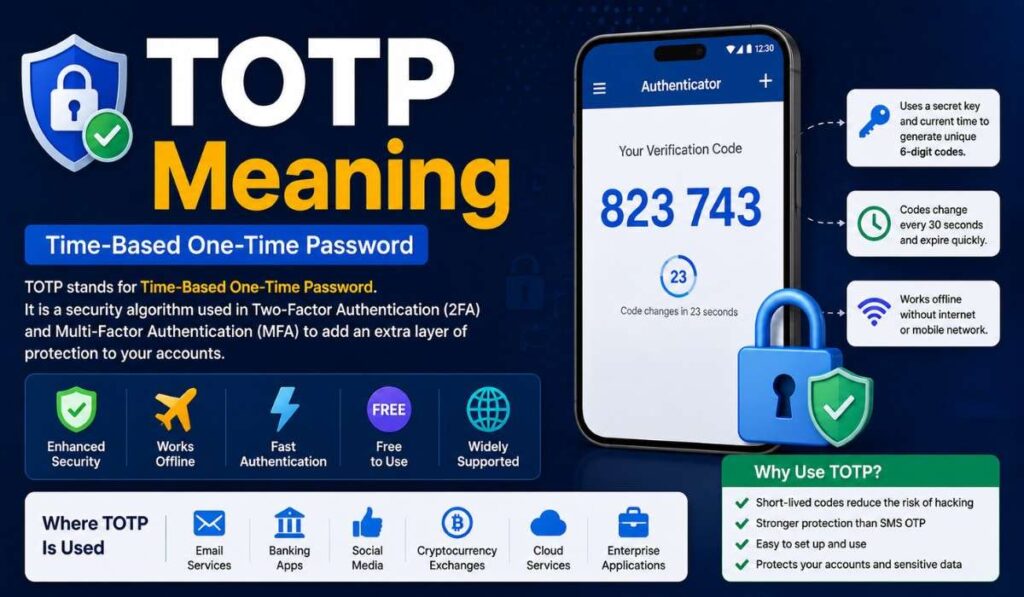
TOTP stands for Time-based One-Time Password, a security method widely used in Two-Factor Authentication (2FA) and Multi-Factor Authentication (MFA) to enhance account security. Instead of relying only on a password, TOTP requires users to enter a unique six-digit verification code generated by an authenticator app. This additional authentication step helps ensure that only the rightful account owner can access the account, even if their password has been compromised.
Unlike traditional passwords, which remain the same until manually changed, a TOTP code is temporary and usually expires every 30 seconds. The code is generated using the current time and a shared secret key stored securely by both the online service and the authenticator app. Because each code is valid for only a short period and cannot be reused, TOTP significantly reduces the risk of hacking, phishing, and unauthorized account access, making it one of the most trusted authentication methods available today.
Read Also: BG Meaning in Chat
What Does TOTP Stand For?
Full Form of TOTP
The full form of TOTP is: Time-based One-Time Password
| Term | Meaning |
| Time-based | The code changes automatically after a fixed time, usually every 30 seconds. |
| One-Time | Each password can only be used once before it expires. |
| Password | A temporary verification code used during login. |
Together, TOTP creates a unique code that helps verify your identity after entering your regular password.
How Does TOTP Work?
TOTP may seem complicated, but the process is actually quite simple. It relies on a shared secret key and the current time to generate a secure code.
Shared Secret Key
When you enable TOTP on an account, the website generates a unique secret key. This key is securely shared with your authenticator app, usually by scanning a QR code. Both the server and your app store the same secret key. It remains private and is never transmitted during each login attempt.
Time Factor
Your authenticator app combines the secret key with the exact current time to generate a six-digit code. Since the time changes every 30 seconds, a new code is created automatically without requiring an internet connection. This time-based approach ensures that the code remains valid only for a short period, significantly reducing the risk of unauthorized access.
Verification Process
When you log in, you first enter your username and password. The website then asks for the current TOTP code from your authenticator app. The server performs the same calculation using the shared secret key and current time. If the generated code matches the one you entered, you are successfully authenticated and granted access.
How TOTP Authentication Works Step by Step
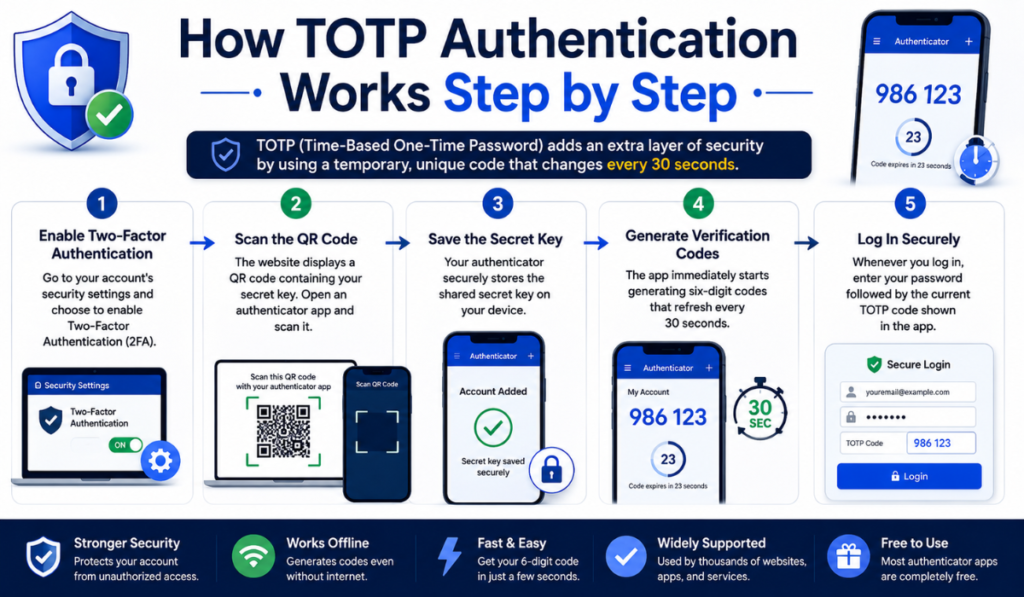
Step 1: Enable Two-Factor Authentication
Go to your account’s security settings and choose to enable Two-Factor Authentication (2FA).
Step 2: Scan the QR Code
The website displays a QR code containing your secret key. Open an authenticator app and scan it.
Step 3: Save the Secret Key
Your authenticator securely stores the shared secret key on your device.
Step 4: Generate Verification Codes
The app immediately starts generating six-digit codes that refresh every 30 seconds.
Step 5: Log In Securely
Whenever you log in, enter your password followed by the current TOTP code shown in the app.
Why Is TOTP Important?
TOTP has become one of the most trusted authentication methods because it significantly improves account security.
Protects Against Password Theft
Even if someone discovers your password, they still need the temporary TOTP code to access your account.
Short-Lived Codes
Each code expires after about 30 seconds, making stolen codes almost useless.
Offline Authentication
Unlike SMS verification, authenticator apps generate codes without requiring mobile data, Wi-Fi, or a cellular signal.
Better Protection
Since codes are generated locally on your device, they cannot be intercepted through SIM-swapping attacks or text message interception.
Benefits of Using TOTP
Enhanced Security
TOTP adds an extra layer of protection beyond your regular password, making it much harder for unauthorized users to access your account. Even if a hacker manages to steal your password through phishing or a data breach, they still need the temporary verification code generated by your authenticator app. This significantly reduces the chances of unauthorized access and keeps your sensitive information more secure.
Works Without Internet
One of the biggest advantages of TOTP is that it works completely offline. Authenticator apps generate verification codes using the current time and a stored secret key, so they do not require Wi-Fi, mobile data, or even a cellular network. This means you can securely log in to your accounts even while traveling or using airplane mode.
Fast Authentication
Using TOTP is both quick and convenient. Once your authenticator app is set up, it automatically generates a new six-digit code every 30 seconds. Entering this code during login takes only a few seconds, providing a smooth authentication experience without compromising security.
Free to Use
Most popular authenticator apps, including Google Authenticator, Microsoft Authenticator, Authy, and 2FAS Authenticator, are available free of charge. Users can download these apps from official app stores and start using TOTP without paying any subscription or setup fees, making it an affordable security solution for everyone.
Widely Supported
TOTP has become the industry standard for two-factor authentication and is supported by thousands of online services worldwide. Major email providers, banking apps, social media platforms, cloud services, cryptocurrency exchanges, and business applications all offer TOTP as a secure login option. Its broad compatibility makes it one of the most trusted and widely adopted authentication methods available today.
Popular TOTP Authenticator Apps
Several authenticator applications support TOTP authentication.
Google Authenticator
Google Authenticator is one of the most popular and widely used TOTP authenticator apps. It generates secure six-digit verification codes that refresh every 30 seconds, helping users protect their online accounts. The app works completely offline, making it a reliable choice for accessing accounts even without an internet connection. Its simple interface and easy setup make it ideal for both beginners and experienced users.
Microsoft Authenticator
Microsoft Authenticator is a feature-rich authentication app that supports TOTP along with passwordless sign-in for Microsoft accounts. In addition to generating one-time passwords, it offers account backup and recovery features, making it easier to restore accounts when switching to a new device. The app also supports biometric authentication, adding another layer of security.
Authy
Authy is a popular authenticator app known for its encrypted cloud backups and multi-device synchronization. Unlike many other authenticator apps, Authy allows users to access their authentication codes across multiple trusted devices. Its backup and recovery features make it an excellent option for users who frequently upgrade or replace their smartphones.
2FAS Authenticator
2FAS Authenticator is a free and privacy-focused app that generates secure TOTP verification codes for two-factor authentication. It features a clean, user-friendly interface and supports a wide range of online services. With strong security measures and optional encrypted backups, 2FAS has become a trusted alternative to other popular authenticator apps.
Duo Mobile
Duo Mobile is widely used by businesses, universities, and organizations to secure employee and student accounts. In addition to supporting TOTP authentication, it works seamlessly with Duo Security’s enterprise authentication platform. The app is known for its reliability, ease of use, and strong security features, making it a preferred choice for corporate environments.
TOTP vs SMS Authentication
Although both methods provide Two-Factor Authentication, TOTP is generally considered more secure.
Comparison Table
| Feature | TOTP | SMS OTP |
| Internet Required | No | No |
| Mobile Network Required | No | Yes |
| Expires Quickly | Yes | Yes |
| Vulnerable to SIM Swapping | No | Yes |
| Can Be Intercepted | Very Difficult | Possible |
| Security Level | High | Moderate |
TOTP vs Push Authentication
Another common authentication method is push notification approval.
TOTP
- Manual code entry
- Works offline
- Highly secure
- No internet required
Push Authentication
- One-tap approval
- Requires internet connection
- More convenient
- Depends on notification delivery
Where Is TOTP Used?
TOTP is widely used across industries to secure sensitive accounts.
Email Services
Many email providers, including Gmail, Outlook, and Proton Mail, support TOTP-based two-factor authentication to improve account security. After entering your password, you’ll need to enter a time-based verification code generated by your authenticator app. This extra step helps prevent unauthorized access, even if someone manages to obtain your password through phishing or a data breach.
Banking Apps
Banks and financial institutions use TOTP to add an additional layer of security for online banking and mobile banking applications. Customers may be asked to enter a TOTP code while logging in, approving transactions, or updating sensitive account information. This helps protect financial data and reduces the risk of fraud and unauthorized transactions.
Social Media
Popular social media platforms such as Facebook, X (formerly Twitter), Instagram, and LinkedIn allow users to enable TOTP-based authentication. By requiring a one-time verification code in addition to a password, these platforms help protect accounts from hacking attempts, phishing attacks, and credential theft.
Cryptocurrency Exchanges
Cryptocurrency exchanges strongly recommend enabling TOTP because digital assets are a common target for cybercriminals. Platforms such as Binance, Coinbase, and Kraken support TOTP authentication to secure user accounts and authorize withdrawals. Since TOTP codes are generated offline and expire quickly, they offer stronger protection than SMS-based verification.
Cloud Services
Leading cloud service providers, including Google Cloud, Microsoft Azure, Amazon Web Services (AWS), and Dropbox, use TOTP to safeguard administrator and user accounts. Enabling TOTP helps prevent unauthorized access to cloud resources, sensitive business data, and critical infrastructure, making it an essential security measure for organizations.
Enterprise Applications
Businesses of all sizes use TOTP to secure employee accounts and protect confidential company information. Enterprise software, remote work platforms, VPNs, customer relationship management (CRM) systems, and collaboration tools often support TOTP-based authentication. By requiring a time-based verification code during login, organizations can significantly reduce the risk of unauthorized access and strengthen their overall cybersecurity.
Is TOTP Safe?
Yes. TOTP is considered one of the safest authentication methods available today.
Its security comes from three important factors:
- Codes change every 30 seconds.
- Secret keys remain private.
- Codes are generated locally on your device.
As long as you protect your phone and recovery codes, TOTP provides excellent security against most online attacks.
Common Mistakes to Avoid
Losing Recovery Codes
One of the most common mistakes users make is failing to save their recovery or backup codes when enabling TOTP. These codes are essential if you lose access to your authenticator app or mobile device. Store them in a secure location, such as a password manager or an offline document, so you can regain access to your account in an emergency.
Deleting the Authenticator App
Deleting your authenticator app without first disabling TOTP on your accounts can leave you locked out. Since the app generates the verification codes needed for login, removing it means you won’t be able to access those codes. Before uninstalling the app or resetting your phone, make sure you transfer your accounts to a new authenticator or disable TOTP temporarily.
Not Backing Up Your Device
If you frequently change or upgrade your smartphone, it’s important to use an authenticator app that supports encrypted backups or account synchronization. Without a proper backup, you may lose access to all your stored TOTP accounts if your device is lost, damaged, or reset. Taking a backup in advance makes the recovery process much easier and helps avoid unnecessary login issues.
Sharing Verification Codes
Your TOTP verification codes should always remain private. Never share them with anyone, even if they claim to be from customer support, your bank, or a trusted company. Legitimate organizations will never ask for your one-time authentication code. Sharing these codes can give cybercriminals temporary access to your account, putting your personal information and sensitive data at risk.
Best Practices for Using TOTP
Use a Trusted Authenticator App
Install apps only from official app stores.
Keep Your Phone Secure
Enable screen lock, fingerprint, or Face ID.
Store Backup Codes Safely
Keep recovery codes in a secure offline location.
Enable TOTP Everywhere
Protect important accounts such as:
- Banking
- Social media
- Cloud storage
- Cryptocurrency wallets
- Password managers
Advantages and Disadvantages of TOTP
Advantages
| Advantage | Description |
| Higher Security | Protects accounts beyond passwords |
| Offline Access | Generates codes without internet |
| Free | Most authenticator apps are free |
| Quick | Takes only seconds to authenticate |
| Broad Compatibility | Supported by most online services |
Disadvantages
| Disadvantage | Description |
| Device Loss | Losing your phone may temporarily lock you out |
| Manual Entry | Users must type the verification code |
| Recovery Needed | Backup codes are essential if your device is lost |
Read Also: WYM Meaning
Frequently Asked Questions (FAQs)
Q1. What is the meaning of TOTP?
TOTP stands for Time-based One-Time Password, a security method that generates temporary verification codes for Two-Factor Authentication (2FA).
Q2. How long is a TOTP code valid?
Most TOTP codes remain valid for 30 seconds, although some services may use slightly different time intervals.
Q3. Does TOTP require an internet connection?
No. TOTP codes are generated locally on your authenticator app and work without an internet or mobile network connection.
Q4. Is TOTP more secure than SMS OTP?
Yes. TOTP is generally more secure because it is not vulnerable to SIM-swapping attacks or SMS interception.
Q5. Which apps support TOTP?
Popular TOTP apps include Google Authenticator, Microsoft Authenticator, Authy, 2FAS Authenticator, and Duo Mobile.
Q6. What happens if I lose my phone?
If you lose your phone, you can regain access using your recovery or backup codes. Some authenticator apps also support encrypted cloud backups for easier account recovery.
Q7. Can I use TOTP for multiple accounts?
Yes. A single authenticator app can securely store and generate TOTP codes for multiple online accounts.
Conclusion
Understanding the TOTP meaning is essential for anyone who wants to improve online security. A Time-based One-Time Password (TOTP) adds a powerful second layer of authentication by generating a unique six-digit code that changes every 30 seconds. Because the code is based on a shared secret key and the current time, it is far more secure than traditional SMS verification and works even without an internet connection.
Whether you’re protecting your email, bank account, social media profiles, cloud services, or cryptocurrency wallet, enabling TOTP is one of the simplest and most effective ways to reduce the risk of unauthorized access. By using a trusted authenticator app and following security best practices, you can significantly strengthen your digital security and keep your online accounts safe.